July 2026
In progressOne Command to HTTPS — Automating Public TLS Across a University
Departments, labs, and clubs each run their own web server, and almost nobody wants to think about TLS. Building a portal and a one-command installer that issue and renew publicly trusted Let's Encrypt certificates on their own — with central visibility over every server. (In progress)
- TLS
- Let's Encrypt
- ACME
- Automation
- DevSecOps
Overview
At KAIST, web services are run by whoever happens to own them — a department, a lab, a student club. The people behind them change often, most have never configured TLS, and every certificate becomes a support ticket for the security team. The result is predictable: certificates lapse, and the outage is the first thing anyone notices.
I’m building a system where the server operator runs one command, once, and never thinks about certificates again: a management portal issues an install script, the server generates its own key, gets a publicly trusted Let’s Encrypt certificate over ACME, and renews itself from then on.
Status: in design & build with the KAIST Information Security Team.
Why public certificates
The first design went the other way — a private ACME CA (step-ca) issuing internal certificates. It worked, but it carried a tax that fell on exactly the people the project is meant to help:
- Every server had to receive and trust a Root CA before it could get a certificate, which meant a bootstrap path, a trust store edit, and a failure mode nobody could debug alone.
- Any client outside that trust store — a phone on cellular, an external auditor, an API consumer — still saw a warning. “Secure” was conditional on configuration nobody controlled centrally.
- The CA itself became infrastructure to run, monitor, and eventually rotate.
Switching to Let’s Encrypt deletes all three. A public CA is already trusted by every browser and OS on earth, so the entire Root CA distribution and trust-setup phase disappears — and the security posture gets better, not worse, because there’s no private trust anchor to protect.
Architecture
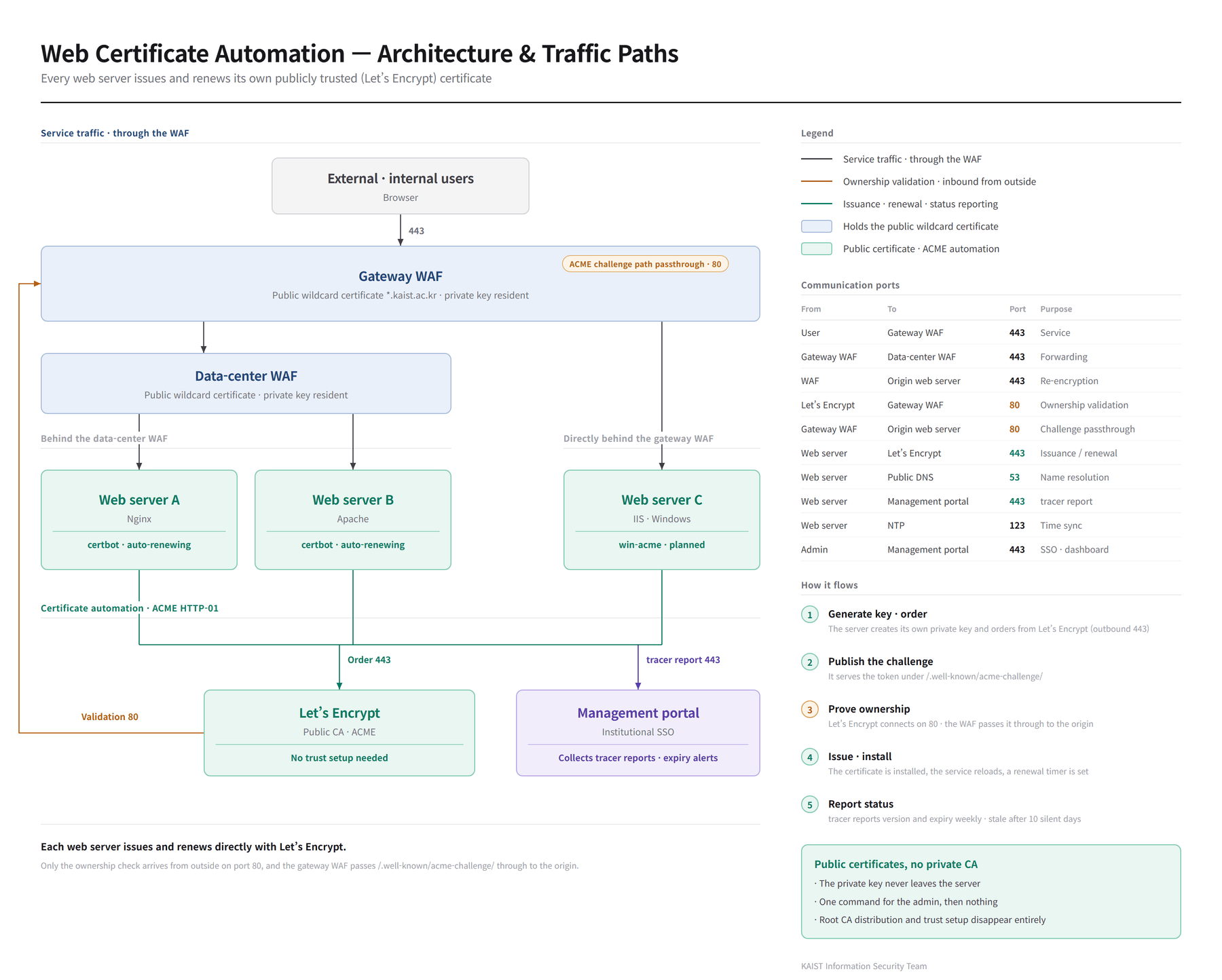
Two paths, deliberately separated:
- Service traffic — through the WAF. User → gateway WAF → origin web servers
(Nginx / Apache / IIS), re-encrypted at each hop over 443. Servers inside the data center sit
behind a second data-center WAF; the rest sit directly behind the gateway WAF. The WAFs hold
the public wildcard certificate (
*.kaist.ac.kr); each origin server holds its own certificate and renews it itself. - Certificate issuance — the server talks to Let’s Encrypt directly. Ordering is an outbound
call on 443. Only the ownership check arrives from outside, on port 80, and the gateway WAF passes
/.well-known/acme-challenge/straight through to the origin.
Supporting components: a management portal behind institutional SSO that hands out install scripts and collects status, and a tracer on each server that reports what version it’s running and when its certificate expires.
How issuance works
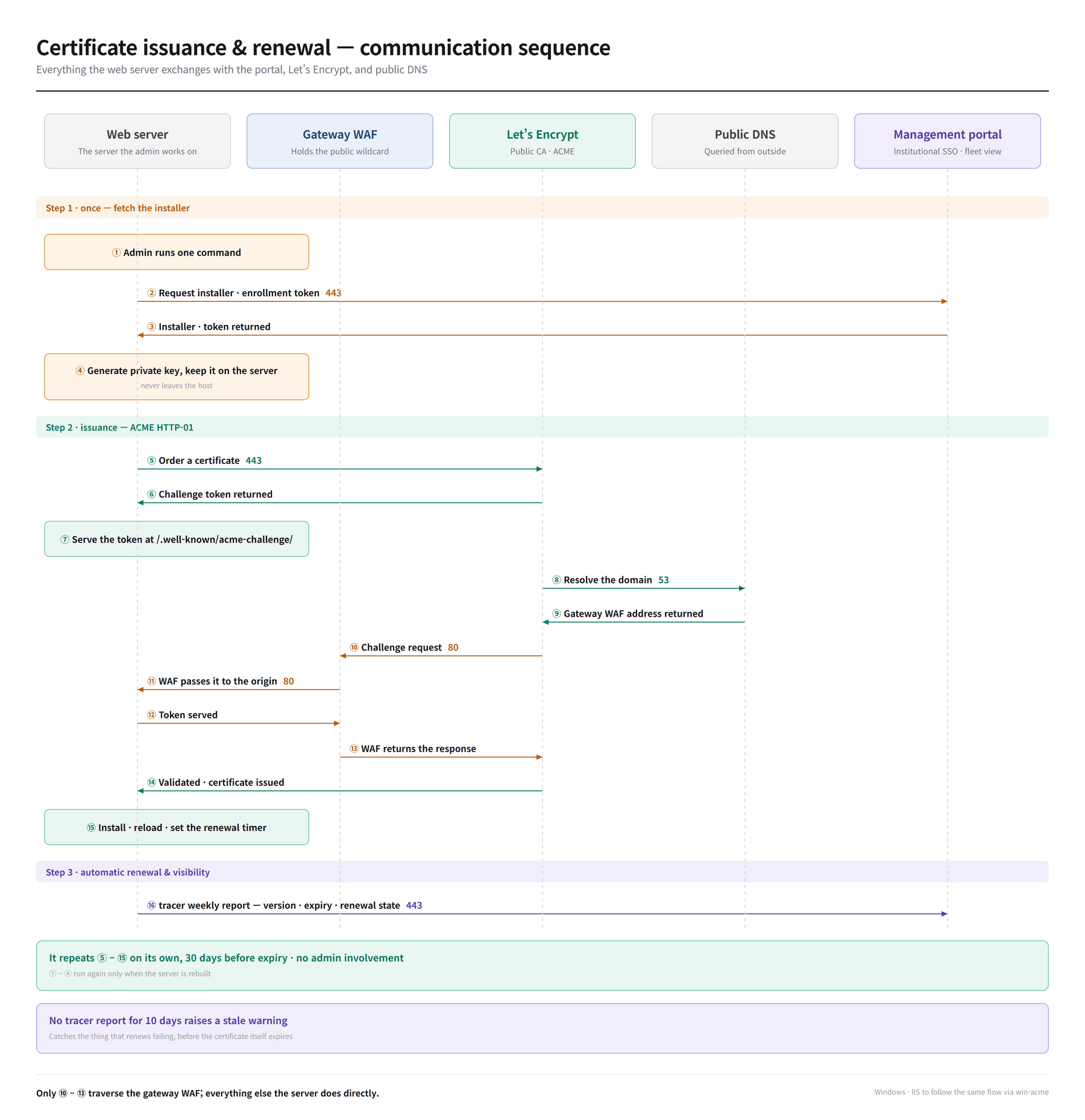
- Fetch the installer — the admin runs one command; the portal returns the script and an enrollment token.
- Generate the key — created on the server and kept there. It never leaves the host, and the portal never sees it.
- Order and prove — the server orders from Let’s Encrypt, serves the challenge token under
/.well-known/acme-challenge/, and Let’s Encrypt validates it over port 80 through the WAF. - Install and schedule — certificate installed, service reloaded, renewal timer registered.
Steps 1–2 run only when a server is rebuilt. Steps 3–4 repeat on their own, 30 days before expiry.
Communication ports
| From | To | Port | Purpose |
|---|---|---|---|
| User | Gateway WAF | 443 | Service |
| Gateway WAF | Data-center WAF | 443 | Forwarding |
| WAF | Origin web server | 443 | Re-encryption |
| Let’s Encrypt | Gateway WAF | 80 | Ownership validation |
| Gateway WAF | Origin web server | 80 | Challenge passthrough |
| Web server | Let’s Encrypt | 443 | Issuance / renewal |
| Web server | Public DNS | 53 | Name resolution |
| Web server | Management portal | 443 | tracer report |
| Web server | NTP | 123 | Time sync |
| Admin | Management portal | 443 | SSO · dashboard |
Watching the thing that renews
Automation that silently stops is worse than no automation, because everyone assumes it’s still working. The installed tracer is a pinned version that does not self-update, so the fleet has to be observable from the outside:
- Each report carries its version, so the portal knows what’s actually deployed where.
- A tracer that goes 10 days without reporting (against a weekly schedule) is marked stale.
- That fires while the certificate is still valid — catching the renewer failing weeks before the certificate would have expired.
Design choices
- HTTP-01 over DNS-01 as the default: it needs no DNS credentials on the server and no delegation, which keeps the install script something a non-specialist can run and read. The cost is real — the domain must be reachable from the internet on port 80, and wildcards aren’t possible — so internal-only services stay on DNS-01 as the exception rather than the rule.
- Private key generated on the server, never transmitted. The portal manages state, not secrets; compromising it does not compromise any service’s key.
- NTP as a dependency, not an assumption. ACME is timestamp-sensitive, and clock drift produces failures that look like everything except a clock problem.
Windows next
Linux servers use certbot. IIS on Windows is the planned second target via win-acme, which speaks the same ACME protocol and can write directly into the Windows certificate store and IIS bindings. The portal, the tracer contract, and the ports above are all designed to be client-agnostic, so Windows joins the same flow rather than getting a parallel one.
Outcome (targeted)
- One command per server, then nothing — no repeat requests to the security or network team.
- No expiry-driven outages, because renewal is automatic and the renewer itself is monitored.
- Universally trusted HTTPS — no trust-store setup on any client, ever.